How to Turn a Voice Note Into a Hotel Lobby AI Video
Short answer: record the message with your phone’s voice recorder, upload the file as Your song on the own song page, drag the orange frame to the part you want and create. The person on the left lip-syncs your recording into the hanging mic while the right one hypes. It runs on Wan 3.0, uses up to 15 seconds and costs the same as the Hotel Lobby track: 6 credits for 12 seconds at 480p.
The site does not record in the browser, so the voice note comes from your phone’s recorder. We checked the upload steps in Safari on an iPhone simulator (iOS 26.5) on October 5, 2026. We have not yet published a finished video made from a voice note, so the section on results says what the generator is set to do, not what we measured.
Updated
VOICE NOTE · HOTEL LOBBY AI
Your voice note, their faces
- Record
- Upload
- Lip-sync
What happens to your voice note
- You pick the file. The page lists MP3, WAV and M4A; AAC and OGG open too. The file can be any length.
- You drag the orange frame to the part you want. The frame is as long as the video: 5, 8, 10, 12 or 15 seconds on the Hotel Lobby stage.
- Your browser cuts that part and uploads only it. A part that needs cutting or converting goes up as a WAV file.
- Wan 3.0 renders the left person lip-syncing to it, with your recording as the soundtrack. The model is told to keep your audio as it is: your voice is not cloned or changed.
Your voice, their faces
Upload your voice note here
Your song is already selected: add the two photos, choose the file and drag the orange frame to the part you want.
Your two performers
One person each. Left raps, right hypes.
Stage
Video & sound
This video: 6 credits. Ready in about 5 to 15 minutes; failed generations return your credits. View pricing
Record a voice note that lip-syncs well
- Keep it under 15 seconds, or record more and pick the best part.
- Start talking right away. The site does not trim silence, so a quiet start means a closed mouth on screen.
- Record somewhere quiet. Background noise is not cleaned up.
- Speak or rap clearly, a little slower than in a chat.
- Want a beat under it? Play it from another speaker while you record, or mix it in an editor first. Everything goes in as one file.
- Write it down first. 12 seconds holds roughly 25 to 35 spoken words.
Three short scripts you can record
- Birthday: “Happy birthday, Grandma Rose! Seventy looks good on you. You still beat me at Mario Kart, you still dance at every wedding, and you still call me first. Love you!”
- Toast: “To Dana and Chris: ten years, two dogs, one very loud couch. Raise your glass to the best duo in the room!”
- Hype intro: “Ladies and gentlemen, from the group chat to the big stage: the one, the only, Marcus, live tonight!”
Get the voice note from your phone into the browser
On iPhone
- In Voice Memos, tap the recording, tap More, then Share, then Save to Files (Apple Support). It saves as an M4A file.
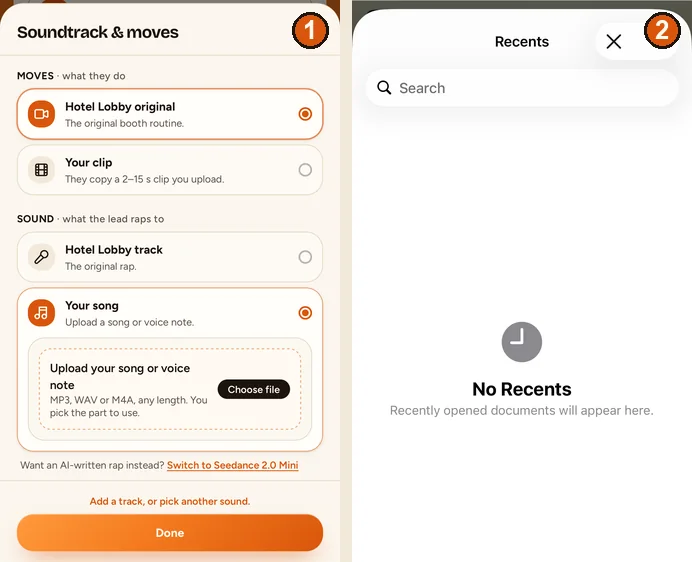
- On the generator, tap Change on the sound row, choose Your song, then Choose file.
- Safari opens the Files picker (Recents, Shared, Browse); there is no Voice Memos button. Find the recording you saved and tap it.
On Android or a computer
Use your recorder app’s Share or Save option to keep the recording as a file, then pick it with Choose file. On a computer, any MP3, WAV or M4A file works. We have not tested an Android recorder yet.
Pick the part and create the video
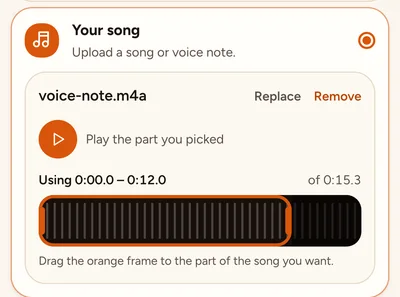
- Drag the orange frame over the waveform. The line above it shows where it sits, for example “Using 0:00.0 – 0:12.0 of 0:15.3”.
- Tap Play the part you picked to hear it.
- If the recording is shorter than the video, the page tells you how many seconds at the end have no voice. Pick a shorter length to avoid them.
- Put the person who should say it on the left.
- Tap Create video. The price is the same as with the Hotel Lobby track.
What to expect from the finished video
- The left person lip-syncs; the right one hypes. Two people cannot lip-sync one recording in one video. To give each of you a part, see two people, one song.
- Lip-sync follows the voice: clear words help, while mumbling or loud music under the voice make it harder.
- The moves are the Hotel Lobby routine unless you also upload Your clip.
- Each try costs credits. A render that fails is refunded automatically.
- We have not published a voice-note test video yet. With the Hotel Lobby track, our tests got the track back almost exactly; a recording should come back the same way, but we have not measured it.
Use a voice note with your own moves
Upload Your clip as the moves and your voice note as Your song: the clip decides how the two of you move, the recording decides what the left person says. How to prepare the clip is in your own reference video.
FAQ
Can I record my voice on the website?
No. Record it with your phone’s voice recorder, save it as a file, then upload it as Your song.
Which voice note files work?
MP3, WAV and M4A, the format of iPhone Voice Memos. AAC and OGG open too. The browser converts what it needs before upload.
How long can my voice note be?
The file can be any length. The video uses 2 to 15 seconds of it, as long as the video you pick.
Does it change or clone my voice?
No. Your recording is the soundtrack, and the model is told to keep it as it is. Only the face on screen moves to it.
Can both people say my voice note?
No. Only the left person lip-syncs. Make two videos with the photos swapped to give each of you a part.
Does a voice note cost more than the Hotel Lobby track?
No. The sound never changes the price: 6 credits for 12 seconds at 480p.
Sources
Read next
Can Two People Take Turns Lip-Syncing Your Own Song?
Your own song with two people: why one video has one singer, how two videos and the swap button give each of you a part, and when the AI rap fits better
How to Make a Birthday Rap Video From Two Photos
A birthday rap video from two photos: the AI rap route and the own-recording route, how to write the topic, what to check and how to share it
How to Use Your Own Reference Video for Hotel Lobby AI
Your clip sets the moves, your photos set the people: clip rules, sound choices, price by length, and what a reference video can and cannot do
Hotel Lobby Video is an independent tool, not affiliated with Quavo, Takeoff, Migos, Quality Control Music, Motown or COLORS.