How to Use Your Own Reference Video for Hotel Lobby AI
Short answer: yes. Under Soundtrack & moves, choose Your clip and upload a video. The two people from your photos copy the clip’s moves, gestures and camera movement in the orange booth or on another stage, and the clip’s background is replaced. The video is as long as the part you use, 2 to 15 seconds, and a 10-second video on Wan 3.0 at 480p is 5 credits.
It is a good fit for filming your own take on the routine. On October 1, 2026, Victoria Monét and Quavo re-shot the booth themselves, captioned “No AI” (Revolt via Yahoo); a clip like that, filmed by you, can be the moves for your two photos. We checked the upload, trimming and pricing steps on October 5 with a 10-second clip of two AI-made dancers we made ourselves. We have not yet published a finished video from an uploaded clip.
Updated
HOTEL LOBBY AI · YOUR OWN MOVES
Your clip, their faces
- Your clip
- Your photos
- Booth video
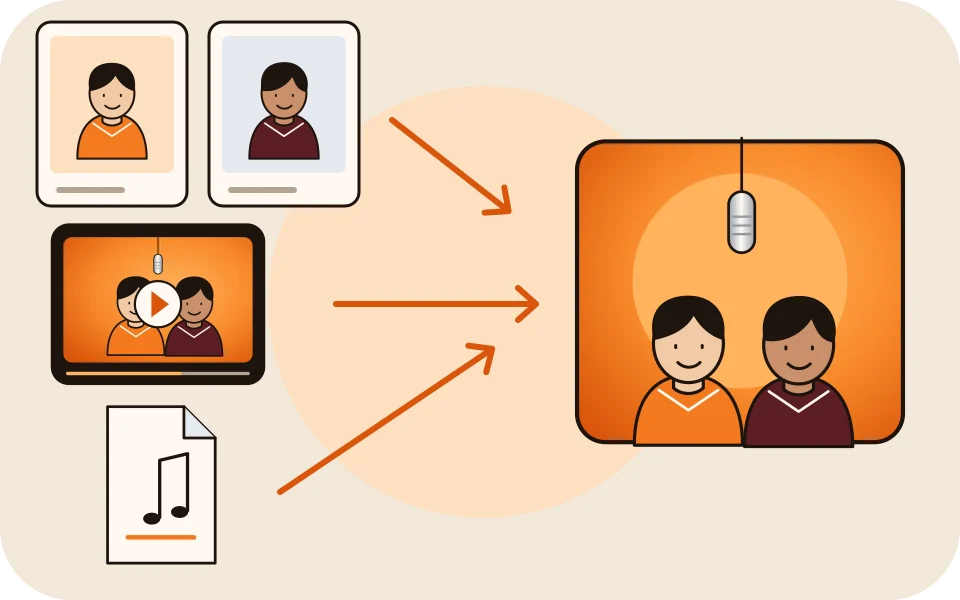
What the photos, the clip and the sound each control
| Input | What it decides | What it does not decide |
|---|---|---|
| Your two photos | Who performs: faces, hair, clothes | The moves |
| Your clip | The moves, gestures, head turns, timing and camera movement | Who appears or where: its people and background are replaced |
| The stage | The set: the orange booth or another stage | The moves |
| The sound | What the left person lip-syncs to on Wan 3.0, or an AI rap on Seedance | The moves |
Bring your moves
Upload your clip here
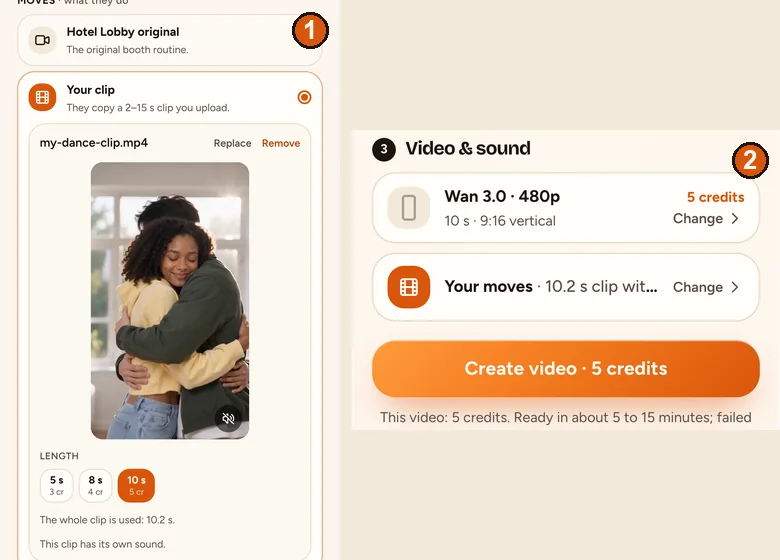
Add the two photos, then open Soundtrack & moves and choose Your clip. The length buttons show the credits.
Your two performers
One person each. Left raps, right hypes.
Stage
Video & sound
This video: 6 credits. Ready in about 5 to 15 minutes; failed generations return your credits. View pricing
Prepare a clip that works
- The file can be any length; 2 to 15 seconds of it are used.
- MP4 or MOV, as your phone camera records it. Clips that are too large or too fast are converted in your browser.
- Normal speed: slow-motion clips do not work.
- Two people side by side, full body, facing the camera. The right performer follows the second person in your clip.
- A steady camera. Camera movement and cuts are copied too.
- A clip you filmed or have the right to use. Avoid clips of famous people: when our booth was re-shot from the original performance, some test videos took on the performers’ faces.
Upload the clip and pick the sound
- Add your two photos. Use full-length photos: with Your clip, the photos are not redrawn first.
- Tap Change on the sound row and choose Your clip under Moves, then upload the video.
- If the clip is longer than the video, drag the orange frame to the part you want. The length buttons show the credits for each length your clip allows.
- Pick the sound: Your clip’s sound (picked first when the clip has sound), the Hotel Lobby track or Your song. A clip without sound falls back to the Hotel Lobby track. On a Seedance model, the sound is an AI rap.
- Check the format. Picking Your clip switches it to Match clip, the shape closest to your clip.
- Tap Create video.
Price and wait with your own clip
| Part of the clip used | Wan 3.0 480p | Wan 3.0 720p |
|---|---|---|
| Up to 5 seconds | 3 credits | 4 credits |
| About 8 seconds | 4 credits | 6 credits |
| About 10 seconds | 5 credits | 8 credits |
| About 12 seconds | 6 credits | 10 credits |
| About 15 seconds | 7 credits | 12 credits |
A part between two lengths is priced at the next length up. The stage and the sound do not change the price. A Wan 3.0 video is usually ready in about 5 to 15 minutes.
What to expect from a reference video
- The model is asked to copy the moves, gestures, timing and camera. We have not measured how closely it follows an uploaded clip.
- Cuts are copied. When our built-in clip had a cut every few seconds, every test video had the same cuts.
- Faces in the clip can leak into the result, as the original performers did in our early tests. Use clips of people who agreed to it.
- With only one person in your clip, the right performer has nobody to follow. We have not tested that case.
- The clip’s background never shows: the stage replaces it.
Your clip or the built-in Hotel Lobby routine?
| Use the built-in routine when | Use your own clip when |
|---|---|
| You want the trend’s exact look and moves | You want another dance, a skit or your own take on the routine |
| You only have face photos (the redraw fills in the body) | You have full-length photos of both people |
| You want the Hotel Lobby track to line up with the moves | Your clip has its own sound, or you bring your own song |
FAQ
Can I use my own video to guide the moves of two people from photos?
Yes. Choose Your clip under Soundtrack & moves and upload 2 to 15 seconds of video. The people from your photos copy its moves on the stage you pick.
Will my clip’s background show in the video?
No. The stage replaces the background; only the moves and the camera come from your clip.
Can I keep my clip’s sound?
Yes. Your clip’s sound is picked first when the clip has sound. You can switch to the Hotel Lobby track or your own song instead.
Can I use a TikTok dance as the reference?
Only a clip you filmed or have the right to use. Clips of other people can also carry their faces into the result.
Which models take my own clip?
Wan 3.0 on any stage, and the Seedance models with an AI rap.
How much does a video from my own clip cost?
The same as any video of that length: 5 credits for 10 seconds on Wan 3.0 at 480p. The sound and the stage do not change the price.
Sources
Read next
How to Do the Hotel Lobby Trend: 3 Ways, Step by Step (2026)
Three ways to do the Hotel Lobby AI trend (two-photo generator, AI video prompt, editor template), with steps, costs, free options and tips
How to Turn a Voice Note Into a Hotel Lobby AI Video
Your recording, their faces: record a voice note, get it into the browser, pick up to 15 seconds and have the person on the left lip-sync it
Which Photos Work Best for Hotel Lobby AI Videos?
A photo checklist for Hotel Lobby AI: what to pick, what the redraw does to your photo, two photos or one, and what better photos cannot fix
Hotel Lobby Video is an independent tool, not affiliated with Quavo, Takeoff, Migos, Quality Control Music, Motown or COLORS.