How to Make a Hotel Lobby AI Video on Your Phone (No App)
Short answer: yes, you can make a Hotel Lobby AI video on your phone without installing anything. Open Hotel Lobby Video in Safari or Chrome, add a photo of each person from your camera roll and tap Create video. A 12-second video on Wan 3.0 at 480p is 6 credits and is usually ready in about 5 to 15 minutes. On iPhone the MP4 goes to the Files app first; to put it in Photos, open it there, tap Share and choose Save Video.
We went through every step below on October 5, 2026, in Safari on an iPhone 17 simulator with iOS 26.5: the generator on hotellobbyvideo.net, and the download and Save Video steps with a test video from a local copy of the site. The Android steps come from Google’s help pages; we have not run them on an Android phone yet.
Updated
HOTEL LOBBY AI · ON YOUR PHONE
Make it on your phone, no app
- Two photos
- Create
- Save to Photos
What you need on your phone
| You need | Details |
|---|---|
| A phone browser | Safari on iPhone or Chrome on Android. No app, no extension. |
| Two photos | One person each, from your camera roll or taken on the spot. JPG, PNG, WebP and iPhone HEIC photos work, at least 300 pixels on each side. |
| A Google account | You sign in the first time you tap Create video. |
| Credits | Paid when you create: 6 for a 12-second video at 480p. The smallest pack is 10 credits for $9.99. |
| About 15 minutes | Mostly waiting. You can switch apps or lock the phone while it renders. |
Right here, on your phone
Make your Hotel Lobby video
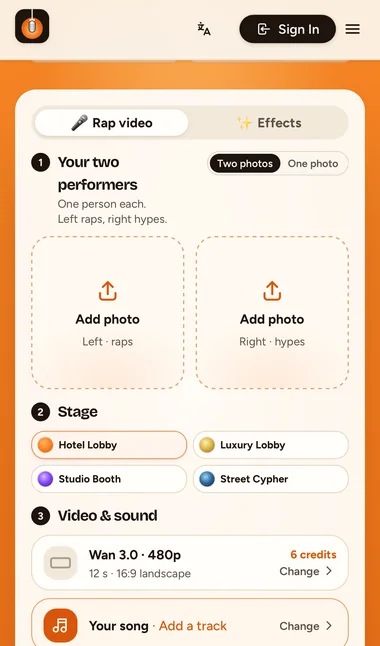
Set to 9:16 for TikTok and Reels. Add a photo of each person; the button shows the credits before you create.
Your two performers
One person each. Left raps, right hypes.
Stage
Video & sound
This video: 6 credits. Ready in about 5 to 15 minutes; failed generations return your credits. View pricing
Make the Hotel Lobby AI video on your phone, step by step
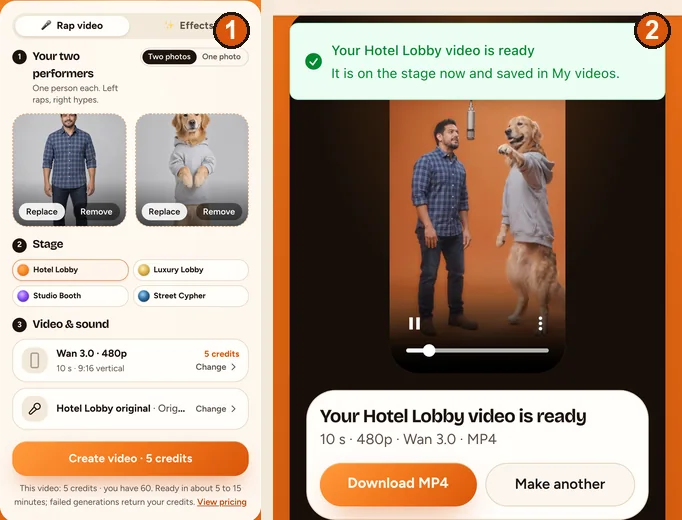
- Open hotellobbyvideo.net and scroll to the generator. Keep Rap video selected.
- Tap Add photo on the left. On iPhone you get Photo Library, Take Photo or Choose File. The left person raps into the hanging mic.
- Add the second photo on the right; that person hypes. Only have a photo of you together? Switch to One photo.
- Keep the Hotel Lobby stage. Under Video & sound, tap Change next to Wan 3.0 to pick the length and the format: 9:16 Vertical for TikTok, Reels and Shorts. Every option shows its credits.
- Tap Change on the sound row to pick what the lead raps to: the Hotel Lobby track, Your song (a recording from your phone) or, on a Seedance model, an AI rap.
- Tap Create video. The first time, sign in with Google; Safari may switch to Google’s page and back, and your photos stay in place. If you need credits, pay, and the video starts on its own when you return.
- Wait. The screen shows a timer and says when the video is ready. You can leave the page: the render keeps going and the video waits in My videos.
Save the Hotel Lobby video to Photos on iPhone
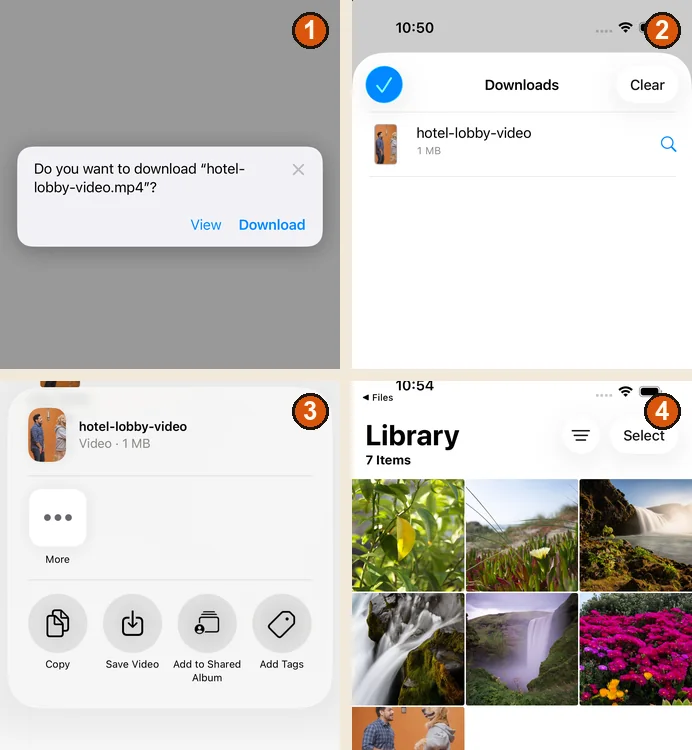
- Tap Download MP4 under the finished video.
- Safari asks whether you want to download “hotel-lobby-video.mp4”. Tap Download.
- The icon at the left of the address bar turns into a download arrow. Tap it, then Downloads, to see the file.
- Open the Files app, tap Browse, then Downloads. With iCloud Drive on it sits in iCloud Drive, Downloads; without it, in On My iPhone, Downloads.
- Touch and hold hotel-lobby-video, tap Share, then Save Video. The video is now in Photos, ready for TikTok, Reels, WhatsApp or Messages.
We tested this on an iPhone 17 simulator with iOS 26.5 on October 5, 2026. Menus can look a little different on other versions; Apple explains where downloads go in Where to find downloads on your iPhone.
Save it on an Android phone
- Tap Download MP4. Chrome saves the file to your downloads.
- To find it, open the Files app on your phone; Chrome also lists it under Downloads (Chrome Help).
- In Google Photos, tap Collections, then On this device, and open the Download folder (Google Photos Help).
We have not tested these Android steps on a phone yet. They come from Google’s help pages, read on October 5, 2026.
Pick settings for the app you post to
| Where you post | Format | What to know |
|---|---|---|
| TikTok | 9:16 | Turn on the AI-generated label. TikTok does not allow AI content showing anyone under 18, or adults who are private people without their permission (TikTok). |
| Instagram Reels | 9:16 | Instagram says Reels should be at least 720 pixels and 30 frames per second (Instagram Help). Our Wan 3.0 720p test measured 720 × 1280 at 30 fps; the 480p default is 480 pixels wide. |
| YouTube Shorts | 9:16 or 1:1 | Square or vertical videos up to three minutes count as Shorts (YouTube Help). |
| WhatsApp or Messages | Any | Send the MP4 from Photos. |
On Wan 3.0, 5, 8, 10, 12 or 15 seconds cost 3, 4, 5, 6 or 7 credits at 480p and 4, 6, 8, 10 or 12 at 720p. More on choosing in 480p, 720p or 1080p.
Fix common phone problems
| What you see | What to do |
|---|---|
| “That photo is too small” | Use the original from your camera roll, at least 300 pixels on each side, not a screenshot of a chat. |
| “That photo is too narrow or too wide” | Crop closer to the person. Panoramas and very wide group shots are refused. |
| Sign-in did not open | Tap Create video again. Safari goes to Google’s page and back, and keeps your photos. |
| You left the page while it rendered | Open My videos from the menu. The render keeps going without you. |
| The video is not in Photos | On iPhone, downloads go to Files first. Use Share, then Save Video. |
| Your voice memo is not in the file list | Save it from Voice Memos to Files first. Steps in turn a voice note into a Hotel Lobby video. |
| “You have 3 videos rendering” | Three videos can render at once. Start the next one when one finishes. |
FAQ
Do I need an app to make a Hotel Lobby AI video on my phone?
No. Hotel Lobby Video runs in Safari, Chrome or another phone browser. There is nothing to install.
Can I close Safari while the video renders?
Yes. The render keeps going on our side, and the finished video waits in My videos when you come back.
Where does the downloaded video go on iPhone?
To the Downloads folder in the Files app. Touch and hold it, tap Share and choose Save Video to add it to Photos.
Can I use iPhone photos in HEIC format?
Yes. The browser converts each photo to JPG before upload and removes its location data.
Is the video free on my phone?
No. Every video is paid with credits when you create it: 6 for a 12-second video at 480p. A render that fails is refunded automatically.
Does the downloaded video have a watermark?
No. Paid videos download as an MP4 without a watermark.
Sources
Read next
Hotel Lobby AI Apps: What Each One Makes (2026)
Hotel Lobby AI apps sorted by what they make, from their own pages: face swaps on the original clip, re-shoots of the routine, AI-song studios, prompt tools and phone app events
How to Do the Hotel Lobby Trend: 3 Ways, Step by Step (2026)
Three ways to do the Hotel Lobby AI trend (two-photo generator, AI video prompt, editor template), with steps, costs, free options and tips
How to Turn a Voice Note Into a Hotel Lobby AI Video
Your recording, their faces: record a voice note, get it into the browser, pick up to 15 seconds and have the person on the left lip-sync it
Hotel Lobby Video is an independent tool, not affiliated with Quavo, Takeoff, Migos, Quality Control Music, Motown or COLORS.